
What is Geofencing
Geofencing adds an on-site verification step for visitors using Qminder.
When enabled, it checks whether a visitor is within a set distance of your location (200 m by default for non-US locations, 700 ft for US locations) before allowing them to check in or join remotely.
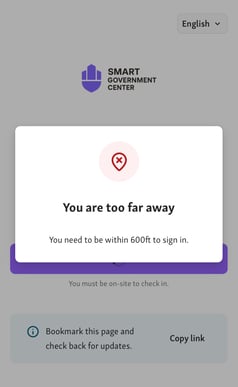
This helps locations prevent early or off-site check-ins, ensuring that only visitors who have actually arrived can proceed.
Where Geofencing applies
Geofencing can be used in two parts of Qminder:
-
Visitor Website → Join Waitlist – restricts remote sign-ins so only visitors near your location can join the queue.
See setup instructions in Create your own Visitor Website (under Enable Virtual waitlist)
-
Appointments → Self check-in – requires visitors to be on-site before confirming their arrival for an appointment.
See setup instructions in Set up Self check-in for Appointments
Settings
Geofencing is configured in one place for both waitlist and appointments.
Go to Location Settings → Visitor Website → Settings.
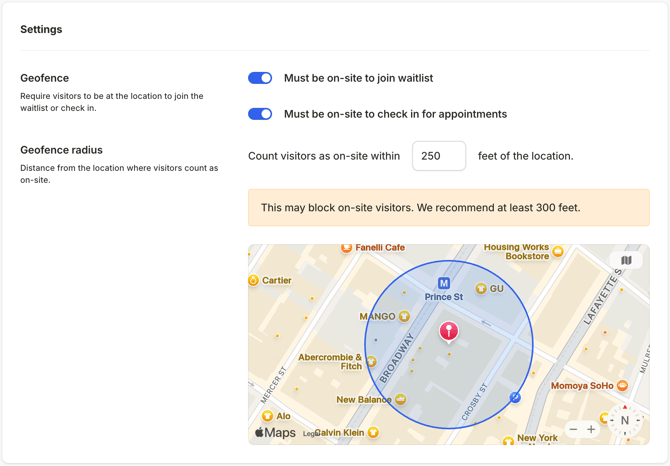
Under Geofence, you'll find two toggles:
- Must be on-site to join waitlist — visitors must be within the geofence radius to join the queue remotely via the Visitor Website.
- Must be on-site to check in for appointments — visitors must be within the geofence radius to confirm their arrival for an appointment.
Under Geofence radius, set the distance within which visitors count as on-site (make sure to set at the minimum the recommended distance):
- Non-US locations: displayed and set in meters (default: 200 m)
- US locations: displayed and set in feet (default: 700 ft)